前言
最近有点时间,就想把网盘中收藏的一个大型项目实现一下,项目中涉及到图片的上传和下载,使用的是分布式文件系统FastDFS。而FastDFS图片服务器需要和Nginx整合后才能提供基于 HTTP协议的下载等功能,所以搭建FastDFS之前得需要简单的了解一下Nginx,于是就有了这篇Blog,后期会继续深入学习Nginx,所以这篇博客就简单的介绍一下Nginx及其安装过程。
一、Nginx 初识
1.1 什么是Nginx
Nginx 是一款高性能的 http 服务器/反向代理服务器及电子邮件(IMAP/POP3)代理服务器。 由俄罗斯的程序设计师 Igor Sysoev 所开发,官方测试 nginx 能够支支撑 5 万并发链接,并 且 cpu、内存等资源消耗却非常低,运行非常稳定。
1.2 应用场景
- http 服务器。Nginx 是一个 http 服务可以独立提供 http 服务。可以做网页静态服务器。
- 虚拟主机。可以实现在一台服务器虚拟出多个网站。例如个人网站使用的虚拟主机。
- 反向代理,负载均衡。当网站的访问量达到一定程度后,单台服务器不能满足用户的请 求时,需要用多台服务器集群可以使用 nginx 做反向代理。并且多台服务器可以平均分担负载,不会因为某台服务器负载高宕机而某台服务器闲置的情况。
1.3 Nginx 安装
1.3.1 Windows环境的安装
- 下载 nginx:官方网站
- 将zip文件加压到自定义目录下即可。
- 加压文件后的主要目录说明:
- conf目录:存放Nginx的主要配置文件,很多功能实现都是通过配置该目录下的nginx.conf文件
- docs目录:存放Nginx服务器的主要文档资料,包括Nginx服务器的LICENSE、OpenSSL的LICENSE、PCRE的LICENSE以及zlib的LICENSE,还包括本版本的Nginx服务器升级的版本变更说明,以及README文档。
- html目录:存放了两个后缀名为.html的静态网页文件,这两个文件与Nginx服务器的运行相关
- logs目录:存放Nginx服务器运行的日志文件
- nginx.exe:启动Nginx服务器的exe文件,如果conf目录下的nginx.conf文件配置正确的话,通过该文件即可启动Nginx服务器
- 启动运行
- 双击加压后的文件中的nginx.exe文件,出现一闪而过的画面,则启动成功
- 然后在浏览器中输入 http://localhost或者 http://localhost:80 会出现启动成功的画面
1.3.2 Linux环境的安装
-
安装环境要求
-
需要安装 gcc 的环境
$ yum install gcc-c++ -
第三方的开发包
-
PCRE(Perl Compatible Regular Expressions) 是一个 Perl 库,包括 perl 兼容的正则表达式 库。nginx 的 http 模块使用 pcre 来解析正则表达式,所以需要在 linux 上安装 pc re 库。
$ yum install -y pcre pcre-devel -
zlib 库提供了很多种压缩和解压缩的方式,nginx 使用 zlib 对 http 包的内容进行 gzip, 所以需要在 linux 上安装 zlib 库。
$ yum install -y zlib zlib-devel -
OpenSSL是一个强大的安全套接字层密码库,囊括主要的密码算法、常用的密钥和证 书封装管理功能及 SSL 协议,并提供丰富的应用程序供测试或其它目的使用。 nginx 不仅支持 http 协议,还支持 https (即在 ssl 协议上传输 http),所以需要在 linux 安装 openssl 库。
$ yum install -y openssl openssl-devel
-
-
-
安装步骤
-
把 nginx 的源码包上传到 linux 系统
$ rz nginx-1.8.0.tar.gz -
安装编译
$ tar -zxvf nginx-1.8.0.tar.gz $ cd nginx-1.8.0-
configure
# ./configure --help查询详细参数(参考本教程附录部分:nginx编译参数)
# 进入 nginx 目录使用 configure 命令创建一 makeFile 文件。
# 参数设置如下:
$ ./configure \
--prefix=/usr/local/nginx \
--pid-path=/var/run/nginx/nginx.pid \
--lock-path=/var/lock/nginx.lock \
--error-log-path=/var/log/nginx/error.log \
--http-log-path=/var/log/nginx/access.log \
--with-http_gzip_static_module \
--http-client-body-temp-path=/var/temp/nginx/client \
--http-proxy-temp-path=/var/temp/nginx/proxy \
--http-fastcgi-temp-path=/var/temp/nginx/fastcgi \
--http-uwsgi-temp-path=/var/temp/nginx/uwsgi \
--http-scgi-temp-path=/var/temp/nginx/scgi
注意:上边将临时文件目录指定为
/var/temp/nginx,需要在/var下创建temp及nginx目录$ mkdir /var/temp/nginx/client –p -
编译安装
$ make
$ make  install
安装成功查看安装目录 :
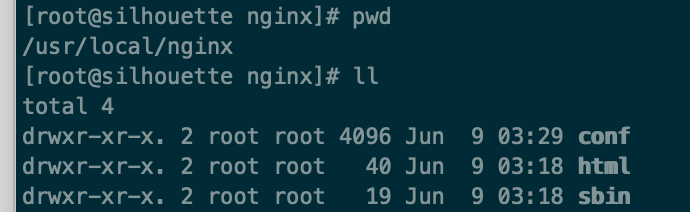
-
-
-
启动 Nginx
$ cd /usr/local/nginx/sbin/
$ ./nginx

# 停止 nginx
# 方式一:此方式相当于先查出nginx进程id再使用kill命令强制杀掉进程
$ ./nginx -s stop
# 方式二:此方式停止步骤是待nginx进程处理任务完毕进行停止。
$ ./nginx -s quit

# 重启 nginx
# 方式一:先停止仔启动(建议使用)
# 即:对nginx进行重启相当于先停止nginx再启动nginx,即先执行停止命令再执行启动命令。
$ ./nginx -s quit
$ ./nginx
# 方式二:重新加载配置文件
# 即:当nginx的配置文件nginx.conf修改后,要想让配置生效需要重启nginx,使用-s reload不用先停止nginx再启动nginx即可将配置信息在nginx中生效
$ ./nginx -s reload
注意:执行
./nginx启动nginx,这里可以-c指定加载的nginx配置文件,如下:./nginx -c /usr/local/nginx/conf/nginx.conf。如果不指定-c,nginx在启动时默认加载conf/nginx.conf文件,此文件的地址也可以在编译安装nginx时指定./configure的参数(--conf-path=**指向配置文件nginx.conf) -
访问 Nginx
nginx安装成功,启动nginx,即可访问虚拟机上的nginx;
192.168.30.201:80 -
开机自启动 nginx
-
编写 shell 脚本
$ vim /etc/init.d/nginx ## 脚本代码 #!/bin/bash # nginx Startup script for the Nginx HTTP Server # it is v.0.0.2 version. # chkconfig: - 85 15 # description: Nginx is a high-performance web and proxy server. # It has a lot of features, but it's not for everyone. # processname: nginx # pidfile: /var/run/nginx.pid # config: /usr/local/nginx/conf/nginx.conf nginxd=/usr/local/nginx/sbin/nginx nginx_config=/usr/local/nginx/conf/nginx.conf nginx_pid=/var/run/nginx.pid RETVAL=0 prog="nginx" # Source function library. . /etc/rc.d/init.d/functions # Source networking configuration. . /etc/sysconfig/network # Check that networking is up. [ ${NETWORKING} = "no" ] && exit 0 [ -x $nginxd ] || exit 0 # Start nginx daemons functions. start() { if [ -e $nginx_pid ];then echo "nginx already running...." exit 1 fi echo -n $"Starting $prog: " daemon $nginxd -c ${nginx_config} RETVAL=$? echo [ $RETVAL = 0 ] && touch /var/lock/subsys/nginx return $RETVAL } # Stop nginx daemons functions. stop() { echo -n $"Stopping $prog: " killproc $nginxd RETVAL=$? echo [ $RETVAL = 0 ] && rm -f /var/lock/subsys/nginx /var/run/nginx.pid } # reload nginx service functions. reload() { echo -n $"Reloading $prog: " #kill -HUP `cat ${nginx_pid}` killproc $nginxd -HUP RETVAL=$? echo } # See how we were called. case "$1" in start) start ;; stop) stop ;; reload) reload ;; restart) stop start ;; status) status $prog RETVAL=$? ;; *) echo $"Usage: $prog {start|stop|restart|reload|status|help}" exit 1 esac exit $RETVAL -
设置文件的访问权限
# a+x ==> all user can execute 所有用户可执行 $ chmod a+x /etc/init.d/nginx $ /etc/init.d/nginx status|start|stop|restart -
加入到
rc.local文件中$ vim /etc/rc.local # 加入一行 /etc/init.d/nginx start 保存并退出,下次重启会生效。
-
1.4 配置虚拟主机
就是在一台服务器启动多个网站。如何区分不同的网站:域名不同、端口不同
1.4.1 通过端口区分不同虚拟机
Nginx 的配置文件: /usr/local/nginx/conf/nginx.conf
#user  nobody;
worker_processes  1;

#error_log  logs/error.log;
#error_log  logs/error.log  notice;
#error_log  logs/error.log  info;

#pid        logs/nginx.pid;


events {
    worker_connections  1024;
}


http {
    include       mime.types;
    default_type  application/octet-stream;

    #log_format  main  '$remote_addr - $remote_user [$time_local] "$request" '
    #                  '$status $body_bytes_sent "$http_referer" '
    #                  '"$http_user_agent" "$http_x_forwarded_for"';

    #access_log  logs/access.log  main;

    sendfile        on;
    #tcp_nopush     on;

    #keepalive_timeout  0;
    keepalive_timeout  65;

    #gzip  on;

    server {
        listen       80;
        server_name  localhost;

        #charset koi8-r;

        #access_log  logs/host.access.log  main;

        location / {
            root   html;
            index  index.html index.htm;
        }

        #error_page  404              /404.html;

        # redirect server error pages to the static page /50x.html
        #
        error_page   500 502 503 504  /50x.html;
        location = /50x.html {
            root   html;
        }

        # proxy the PHP scripts to Apache listening on 127.0.0.1:80
        #
        #location ~ \.php$ {
        #    proxy_pass   http://127.0.0.1;
        #}

        # pass the PHP scripts to FastCGI server listening on 127.0.0.1:9000
        #
        #location ~ \.php$ {
        #    root           html;
        #    fastcgi_pass   127.0.0.1:9000;
        #    fastcgi_index  index.php;
        #    fastcgi_param  SCRIPT_FILENAME  /scripts$fastcgi_script_name;
        #    include        fastcgi_params;
        #}

        # deny access to .htaccess files, if Apache's document root
        # concurs with nginx's one
        #
        #location ~ /\.ht {
        #    deny  all;
        #}
    }


    # another virtual host using mix of IP-, name-, and port-based configuration
    #
    #server {
    #    listen       8000;
    #    listen       somename:8080;
    #    server_name  somename  alias  another.alias;

    #    location / {
    #        root   html;
    #        index  index.html index.htm;
    #    }
    #}


    # HTTPS server
    #
    #server {
    #    listen       443 ssl;
    #    server_name  localhost;

    #    ssl_certificate      cert.pem;
    #    ssl_certificate_key  cert.key;

    #    ssl_session_cache    shared:SSL:1m;
    #    ssl_session_timeout  5m;

    #    ssl_ciphers  HIGH:!aNULL:!MD5;
    #    ssl_prefer_server_ciphers  on;

    #    location / {
    #        root   html;
    #        index  index.html index.htm;
    #    }
    #}

}
一个 server 节点就是一个虚拟主机,可以配置多个 server,配置了多个虚拟主机。
-
添加虚拟主机:
-
复制一份 html 文件夹
$ cp -r html html81 -
修改 html81 中的 index.html
-
修改 nginx 的配置文 nginx.conf 件如下:
worker_processes 1; events { worker_connections 1024; } http { include mime.types; default_type application/octet-stream; sendfile on; keepalive_timeout 65; server { listen 80; server_name localhost; location / { root html; index index.html index.htm; } error_page 500 502 503 504 /50x.html; location = /50x.html { root html; } } # 一个 server 节点就是一个虚拟主机 server { listen 81; server_name localhost; location / { root html81; index index.html index.htm; } } } -
重新加载配置文件
$ sbin/nginx -s reload
-
1.4.2 通过域名区分虚拟主机
-
域名就是网站。
www.baidu.com www.taobao.com www.jd.com -
Dns 服务器:把域名解析为 ip 地址。保存的就是域名和 ip 的映射关系。
# 一级域名:
		Baidu.com
		Taobao.com
		Jd.com
# 二级域名:
    www.baidu.com
		Image.baidu.com
		Item.baidu.com
# 三级域名:
		1.Image.baidu.com
		Aaa.image.baidu.com
一个域名对应一个 ip 地址,一个 ip 地址可以被多个域名绑定。
1.5 反向代理
1.5.1 反向代理
-
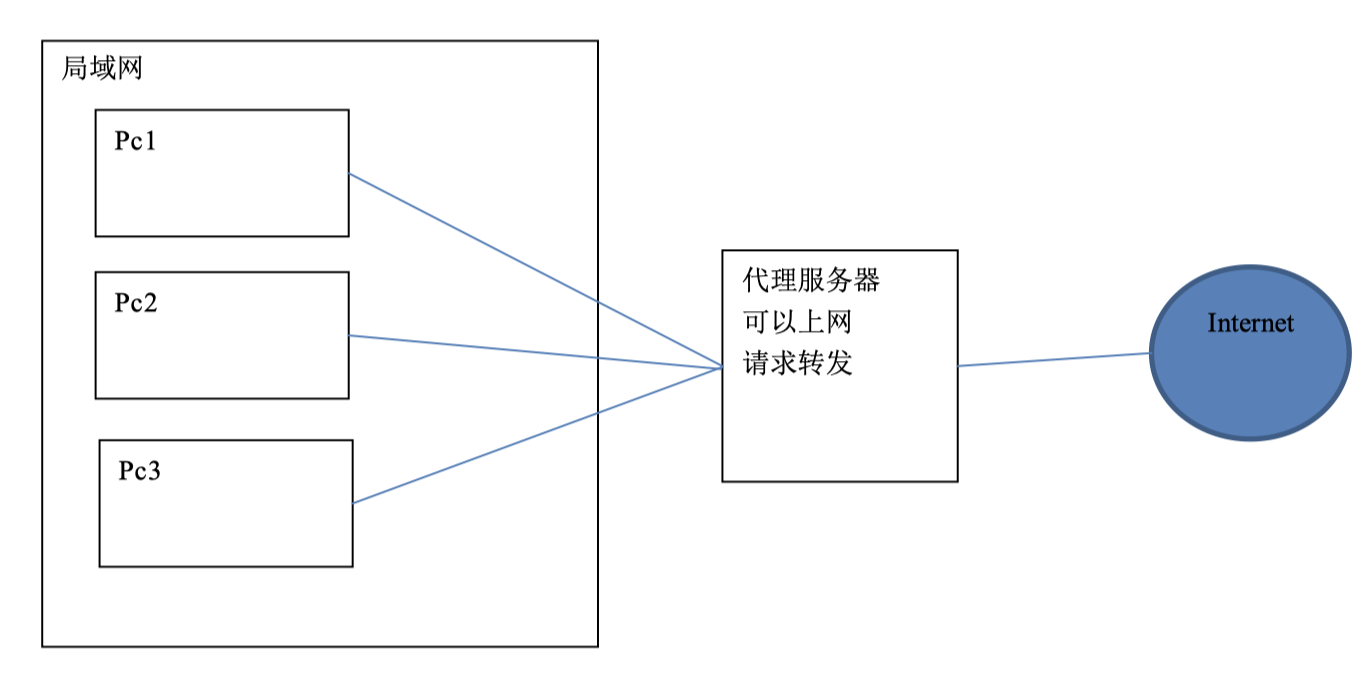
正向代理是在用户端。比如需要访问国外的网站,就需要VPN服务器将我们的IP地址变成国外的地址。
-
正向代理服务器位于客户端和服务器之间,为了向服务器获取数据,客户端要向代理服务器发送一个请求,并指定目标服务器,代理服务器将目标服务器返回的数据转交给客户端。这里客户端要进行一些正向代理的设置。
1.5.2 反向代理
-
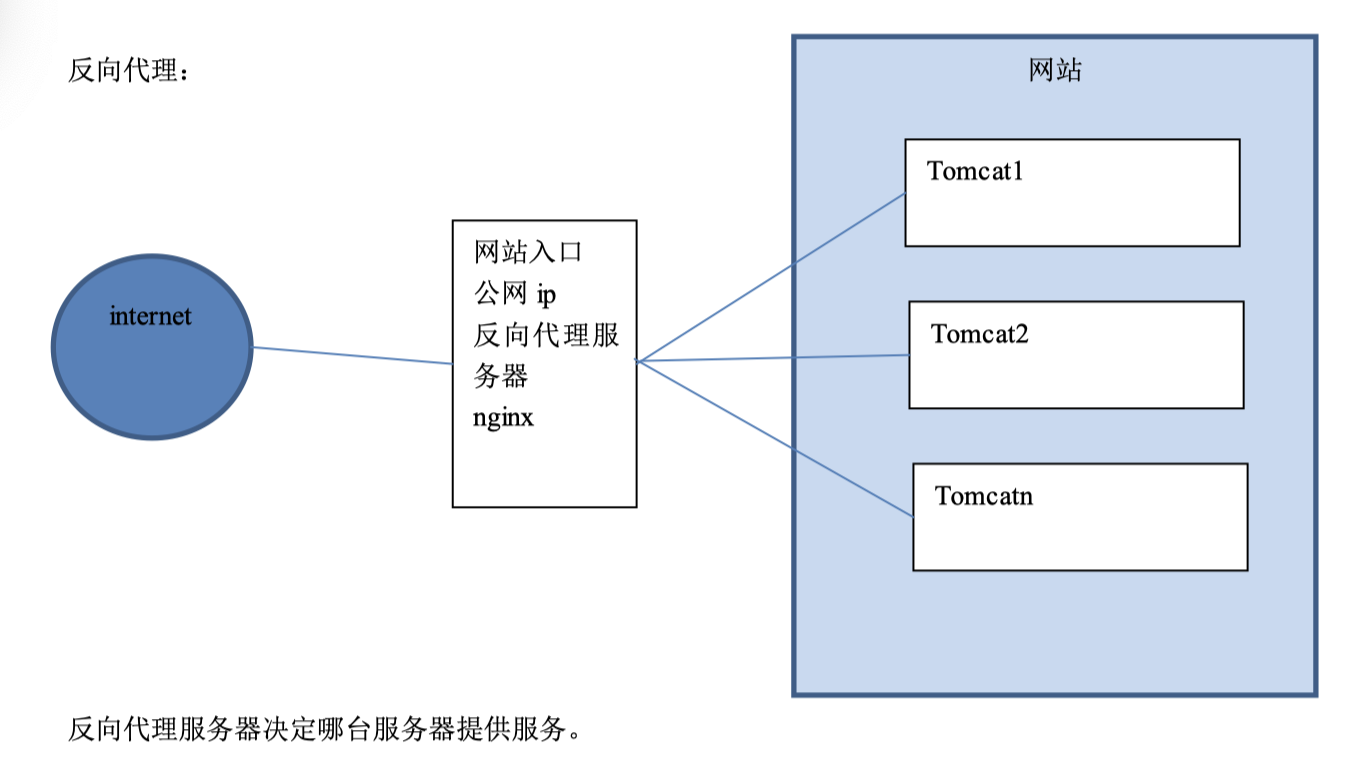
反向代理,其实客户端对代理是无感知的,因为客户端不需要任何配置就可以访问,我们只需要将请求发送到反向代理服务器,由反向代理服务器去选择目标服务器获取数据后,在返回给客户端,此时反向代理服务器和目标服务器对外就是一个服务器,暴露的是代理服务器地址,隐藏了真实服务器IP地址。
1.5.3 Nginx 实现反向代理
两个域名指向同一台 nginx 服务器,用户访问不同的域名显示不同的网页内容。 两个域名是 www.sian.com.cn 和 www.sohu.com
-
安装两个 tomcat,分别运行在 8080 和 8081 端口。
$ vim /home/silhouette/apache-tomcat-8.5.38-2/conf/server.xml注意:需要修改http访问端口(默认为8080端口)、监听tomcat关闭的端口(默认为8005)、负责接收其他http服务器的请求端口(默认为8009)。
-
修改两个tomcat的首页内容,启动两个 tomcat。
$ vim /home/silhouette/apache-tomcat-8.5.38-2/webapps/ROOT/index.jsp -
反向代理服务器的配置
upstream tomcat1{ server 192.168.30.77:8888; } server { listen 80; server_name 8888.silhouette.com; location / { proxy_pass http://tomcat1; index index.html index.htm; } } upstream tomcat2{ server 192.168.30.77:8080; } server { listen 80; server_name 8080.silhouette.com; location / { proxy_pass http://tomcat2; index index.html index.htm; } } -
nginx重新加载配置文件
$ ./nginx -s reload -
配置域名:在hosts文件中添加域名和ip的映射关系
$ vim /etc/hosts
####添加条目,如下:
192.168.30.77  8081.silhouette.com
192.168.30.77  8080.silhouette.com
注意:配置域名与IP的映射是在宿主机上,而不是在虚拟机上
